
Dashboard
- All recorded calls, company metrics and booking percentage rate will be on this tab.
Residential Daily Revenue:
1. Dashboard
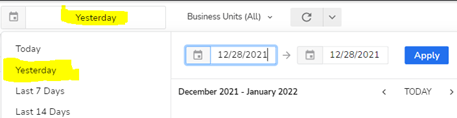
2. Go to yesterday
3. Business Units (Drop down arrow)
4. Select None
5. Select HVAC – Residential Maintenance, HVAC – Residential Service, Plumbing – Maintenance and Plumbing – Service
6. Select Apply
7. Completed Revenue
Classifying Recorded Calls:
1. Dashboard
2. Go to Yesterday
3. Scroll down to CSR Metrics, Agent Scorecards
– If you are classifying your individual scorecard select your name. If you are classifying to provide booking rate, open all scorecards. When doing so each one will open a new tab.
4. Click on the call and press “I’d like to reclassify the call”
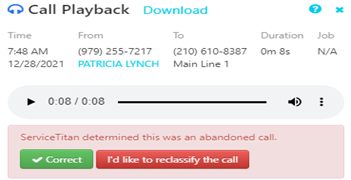
5. Press play and skip to the beginning of answered call. Select the name of the person answering in “Who took the call?”
– If Schedule Engine answered select Marketing
-* If the commercial department answered. Select their name and choose follow up *
– If there was not an answer, select Dispatch
6. Once select the agent answering the type of call will fall into two categories. Booked or not booked.
Job not Booked Options:
This WAS NOT a service request. Excuse it.
- Don’t Provide services needed
- Employee phone call
- Follow up call
- Hang Up
- Home Depot Purchase
- New Order
- Out of Service Area
- Personal phone call
- Technician called in
- Transferred call
- Vendor/Marketing
- Vendor/Parts
- Wrong Number
This WAS a service request that was not booked.
- Customer called to cancel
- Customer said they will call back
- Customer wanted price over the phone
- Customer wanted price over the phone -HVAC
- Customer wanted price over the phone – Plumbing
- Didn’t want to pay dispatch fee
- Didn’t want to pay dispatch fee -HVAC
- Didn’t want to pay dispatch fee -Plumbing
- Need landlord permission
- Unable to meet customer’s schedule
7. Booked Job Options:
This call was related to an existing job. If there is a name highlighted in blue copy and paste the name into the search.
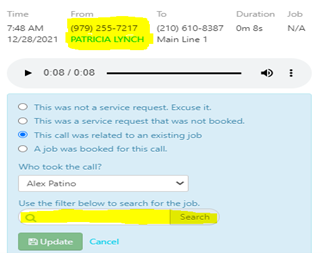
If the number is not saved in an account. Listen for an address, alternative name or invoice in the recording to search.
8. The options below are jobs relevant to customer. *The dates shown will be based on date created not date booked for*. If you hear the customer is following up on a preexisting job, stay in this category and select recent dated job.

9. A job was booked for this call
– Follow same procedure from Step 7.